> ## Documentation Index
> Fetch the complete documentation index at: https://docs.lemonado.io/llms.txt
> Use this file to discover all available pages before exploring further.
# Workspace tour
> Find your chats, reports, connections, routines, and company settings.
Lemonado keeps the tools you use most in the left menu.
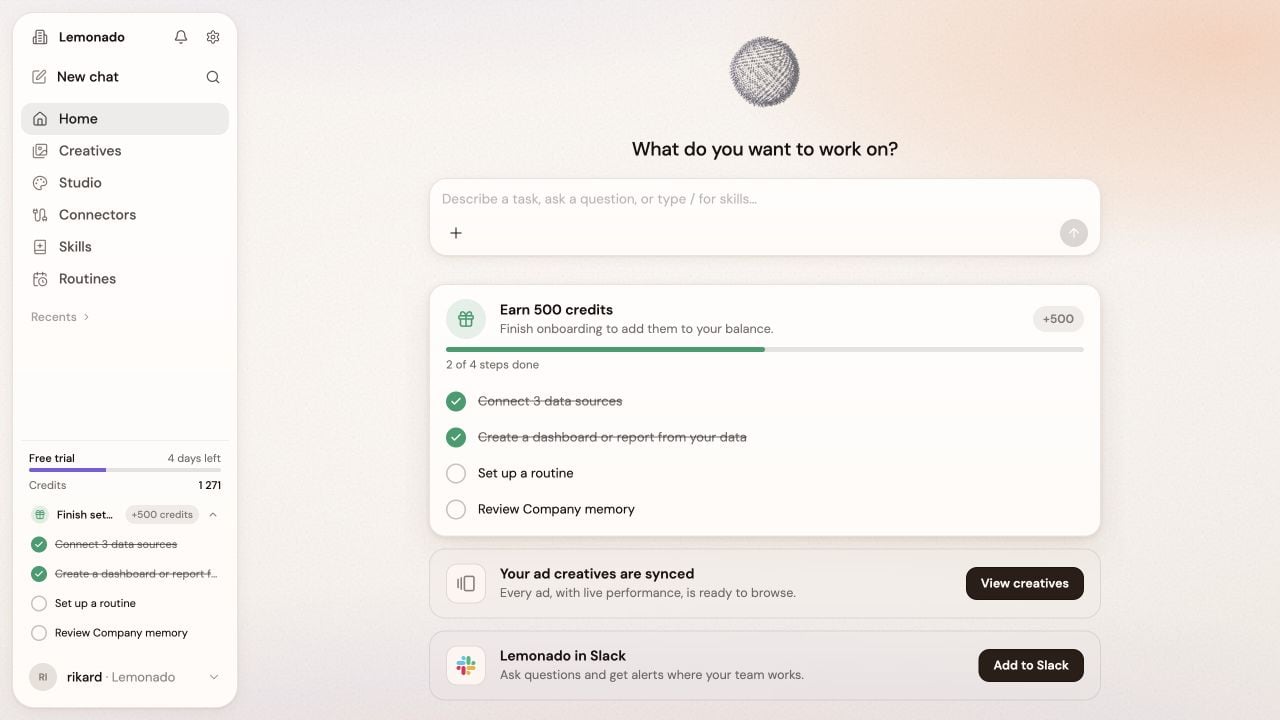 | Area | Use it for |
| - | - |
| **Home** | Ask a question or start a piece of work. |
| **Creatives** | Review ads, compare results, and find inspiration. |
| **Studio** | Create reports, dashboards, and slides. |
| **Connectors** | Add the tools and data Lemonado can use. |
| **Skills** | Reuse instructions for common marketing jobs. |
| **Routines** | Run regular checks and reports. |
| **Portal** | Share reviewed work with a client, on supported agency plans. |
## Find your way around
* Click **New chat** when you want a clean start.
* Use **Recents** to return to earlier work.
* Click the gear beside the company name for **Memory**, **Brand**, and company settings.
## Stay organized
* Use the magnifying glass to search earlier chats.
* Open the bell for notifications and invitations.
* Open your profile at the bottom left, then choose **Settings** for personal and workspace settings.
* Workspace owners can manage members, billing, and usage there.
Organize chats, invite teammates, and ask for feedback.
These areas appear only when enabled for your workspace.
* **Files:** choose **Personal** for your own files or **Workspace** to share with the team. Use **Upload** to add files and **New folder** to organize them.
* **Warehouse:** explore your data in tables. Ask the assistant to filter or explain a view, then **Save** it for later. Check who the saved view is available to.
This documentation is built and hosted on [Mintlify](https://mintlify.com), a developer documentation platform.
| Area | Use it for |
| - | - |
| **Home** | Ask a question or start a piece of work. |
| **Creatives** | Review ads, compare results, and find inspiration. |
| **Studio** | Create reports, dashboards, and slides. |
| **Connectors** | Add the tools and data Lemonado can use. |
| **Skills** | Reuse instructions for common marketing jobs. |
| **Routines** | Run regular checks and reports. |
| **Portal** | Share reviewed work with a client, on supported agency plans. |
## Find your way around
* Click **New chat** when you want a clean start.
* Use **Recents** to return to earlier work.
* Click the gear beside the company name for **Memory**, **Brand**, and company settings.
## Stay organized
* Use the magnifying glass to search earlier chats.
* Open the bell for notifications and invitations.
* Open your profile at the bottom left, then choose **Settings** for personal and workspace settings.
* Workspace owners can manage members, billing, and usage there.
Organize chats, invite teammates, and ask for feedback.
These areas appear only when enabled for your workspace.
* **Files:** choose **Personal** for your own files or **Workspace** to share with the team. Use **Upload** to add files and **New folder** to organize them.
* **Warehouse:** explore your data in tables. Ask the assistant to filter or explain a view, then **Save** it for later. Check who the saved view is available to.
This documentation is built and hosted on [Mintlify](https://mintlify.com), a developer documentation platform.