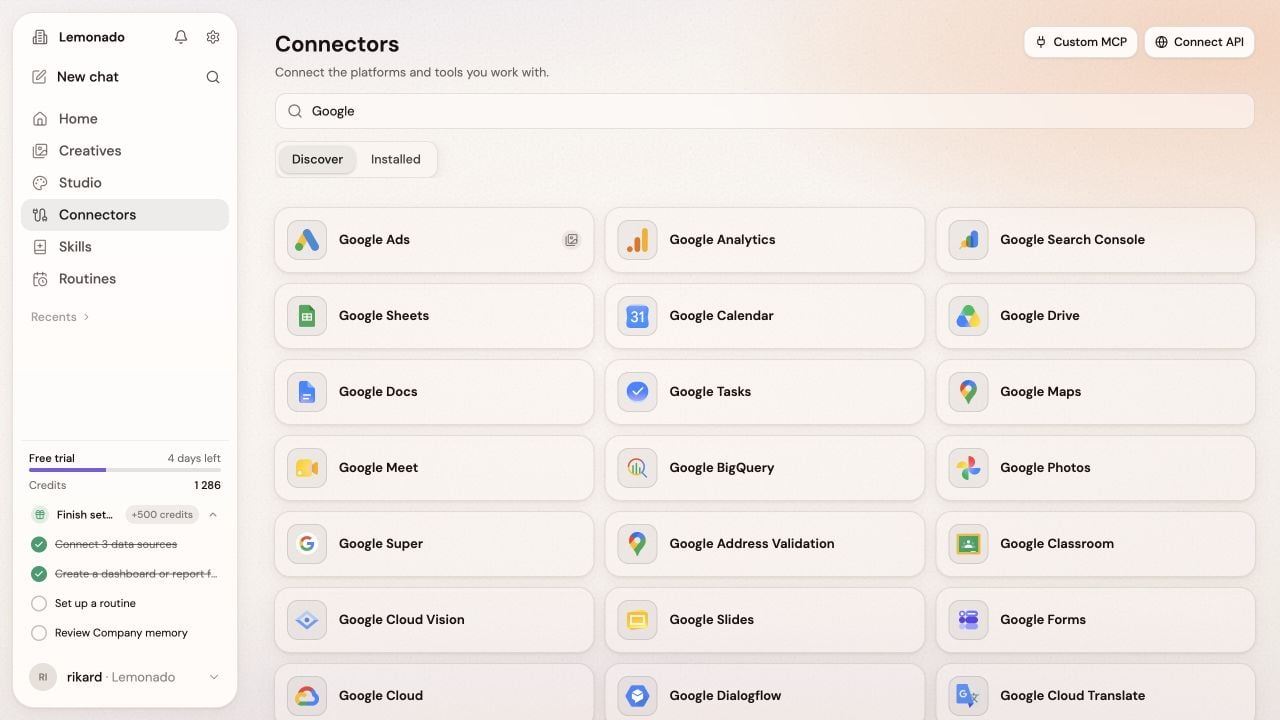
Some connectors can make changes as well as read data. An owner or admin can set each action to Off, Ask, or Approve.Choose Ask when you want to review an action before it runs. Approve lets that action run without asking each time.
In an agency workspace, a shared connection still needs to be installed for the right client. Check the client name before adding an account.
You can also upload a CSV. If you cannot add a connection, ask your workspace owner or admin.
{"docsConfig":{"theme":"mint","$schema":"https://mintlify.com/docs.json","name":"Lemonado","description":"Simple guides for getting useful marketing work done with Lemonado.","colors":{"primary":"#000000","light":"#FFFFFF","dark":"#000000"},"logo":{"light":"https://mintcdn.com/lemonado/xBRaqsxFlRX5o_7k/logo/light.svg?fit=max\u0026auto=format\u0026n=xBRaqsxFlRX5o_7k\u0026q=85\u0026s=8433b02fb9d9cb7e90b1c84b733d5099","dark":"https://mintcdn.com/lemonado/xBRaqsxFlRX5o_7k/logo/dark.svg?fit=max\u0026auto=format\u0026n=xBRaqsxFlRX5o_7k\u0026q=85\u0026s=16d64a6fae04cb4ccf8676c820a6e7e4","href":"/"},"favicon":"https://mintcdn.com/lemonado/xBRaqsxFlRX5o_7k/lemonado-favicon.svg?fit=max\u0026auto=format\u0026n=xBRaqsxFlRX5o_7k\u0026q=85\u0026s=9a8185501133353520c64ab08846177e","navbar":{"links":[{"href":"https://lemonado.io","label":"Website"},{"href":"mailto:support@lemonado.io","label":"Support"}],"primary":{"type":"button","label":"Open Lemonado","href":"https://app.lemonado.io"}},"fonts":{"family":"Inter"},"icons":{"library":"lucide"},"contextual":{"options":[],"display":"header"},"styling":{"latex":false},"navigation":{"pages":[]}},"deployment":{"deploymentMetadataValue":{"subdomain":"lemonado","hasAudioNarration":false,"actualSubdomain":"lemonado","customDomains":["docs.lemonado.io"],"gitSource":{"type":"github","owner":"lemonadolabs","repo":"mintlify-docs","deployBranch":"main","contentDirectory":"","isPrivate":false,"mountPath":"","label":""},"chroma":{"collectionId":"53183011-1572-49df-a211-bbde8ae2d0f0","liveDeploymentHistoryId":"6ac8e992c59727150ce71fce","schemaVersion":"v3","latestBuiltDeploymentHistoryId":"6ac8e992c59727150ce71fce"},"entitlements":{"AI_CHAT":{"status":"DISABLED"}},"buildId":"6ac8e992c59727150ce71fce","clientVersion":"0.0.4067","searchFilterCounts":[{"language":"default","tag":"Use Lemonado","count":11},{"language":"default","tag":"Start here","count":4},{"language":"default","tag":"For agencies","count":2}]},"assistantConfig":{"enableAskAiButton":false,"enableStarterQuestions":false,"enableContextualStarterQuestions":false,"enableAskAiSearchBar":true},"basePath":"","hasChatPermissions":false,"hasWebMcpPermissions":false,"toggles":[{"name":"kill-isr","enabled":true,"variant":{"name":"disabled","enabled":false,"feature_enabled":true},"impressionData":false},{"name":"agent-mintlify-slack","enabled":true,"variant":{"name":"disabled","enabled":false,"feature_enabled":true},"impressionData":false},{"name":"agent-integrations-settings","enabled":true,"variant":{"name":"disabled","enabled":false,"feature_enabled":true},"impressionData":false},{"name":"rbac-expansion","enabled":true,"variant":{"name":"disabled","enabled":false,"feature_enabled":true},"impressionData":false},{"name":"automations-pr-grouping","enabled":true,"variant":{"name":"disabled","enabled":false,"feature_enabled":true},"impressionData":false},{"name":"custom-prefix","enabled":true,"variant":{"name":"disabled","enabled":false,"feature_enabled":true},"impressionData":false},{"name":"analytics-v7","enabled":true,"variant":{"name":"disabled","enabled":false,"feature_enabled":true},"impressionData":false},{"name":"user-flows-analytics","enabled":true,"variant":{"name":"disabled","enabled":false,"feature_enabled":true},"impressionData":false},{"name":"no-publish-flow","enabled":true,"variant":{"name":"disabled","enabled":false,"feature_enabled":true},"impressionData":false},{"name":"workos-onboarding","enabled":true,"variant":{"name":"disabled","enabled":false,"feature_enabled":true},"impressionData":false},{"name":"llms-txt-v2","enabled":true,"variant":{"name":"disabled","enabled":false,"feature_enabled":true},"impressionData":false},{"name":"snapshot-serving-live","enabled":true,"variant":{"name":"disabled","enabled":false,"feature_enabled":true},"impressionData":false},{"name":"stripTemperatureMiddleware","enabled":true,"variant":{"name":"disabled","enabled":false,"feature_enabled":true},"impressionData":false},{"name":"support-platform-pylon-zendesk","enabled":true,"variant":{"name":"disabled","enabled":false,"feature_enabled":true},"impressionData":false},{"name":"snapshot-serving","enabled":true,"variant":{"name":"disabled","enabled":false,"feature_enabled":true},"impressionData":false},{"name":"instant-rollback","enabled":true,"variant":{"name":"disabled","enabled":false,"feature_enabled":true},"impressionData":false},{"name":"granular-notifications-server","enabled":true,"variant":{"name":"disabled","enabled":false,"feature_enabled":true},"impressionData":false},{"name":"granular-notifications","enabled":true,"variant":{"name":"disabled","enabled":false,"feature_enabled":true},"impressionData":false},{"name":"automations-fable","enabled":true,"variant":{"name":"disabled","enabled":false,"feature_enabled":true},"impressionData":false},{"name":"fixed-ai-action-pricing","enabled":true,"variant":{"name":"disabled","enabled":false,"feature_enabled":true},"impressionData":false},{"name":"automation-resolve-merge-conflict","enabled":true,"variant":{"name":"disabled","enabled":false,"feature_enabled":true},"impressionData":false},{"name":"scoped-publishing","enabled":true,"variant":{"name":"disabled","enabled":false,"feature_enabled":true},"impressionData":false},{"name":"mintql","enabled":true,"variant":{"name":"disabled","enabled":false,"feature_enabled":true},"impressionData":false},{"name":"page-level-analytics","enabled":true,"variant":{"name":"disabled","enabled":false,"feature_enabled":true},"impressionData":false},{"name":"editor-version-history-v2","enabled":true,"variant":{"name":"disabled","enabled":false,"feature_enabled":true},"impressionData":false},{"name":"billing-page-v2","enabled":true,"variant":{"name":"disabled","enabled":false,"feature_enabled":true},"impressionData":false},{"name":"full-page-search","enabled":true,"variant":{"name":"disabled","enabled":false,"feature_enabled":true},"impressionData":false},{"name":"workspace-projects","enabled":true,"variant":{"name":"disabled","enabled":false,"feature_enabled":true},"impressionData":false},{"name":"assistant-v5","enabled":true,"variant":{"name":"disabled","enabled":false,"feature_enabled":true},"impressionData":false},{"name":"fork-pr-previews","enabled":true,"variant":{"name":"disabled","enabled":false,"feature_enabled":true},"impressionData":false},{"name":"revalidation-jwt","enabled":true,"variant":{"name":"disabled","enabled":false,"feature_enabled":true},"impressionData":false},{"name":"vite-origin","enabled":true,"variant":{"name":"disabled","enabled":false,"feature_enabled":true},"impressionData":false},{"name":"workos-sso-scim","enabled":true,"variant":{"name":"disabled","enabled":false,"feature_enabled":true},"impressionData":false},{"name":"hobby-abuse-scan","enabled":true,"variant":{"name":"disabled","enabled":false,"feature_enabled":true},"impressionData":false},{"name":"dashboard-inbox","enabled":true,"variant":{"name":"disabled","enabled":false,"feature_enabled":true},"impressionData":false},{"name":"workos-signup","enabled":true,"variant":{"name":"disabled","enabled":false,"feature_enabled":true},"impressionData":false},{"name":"turbopuffer-dual-write","enabled":true,"variant":{"name":"disabled","enabled":false,"feature_enabled":true},"impressionData":false},{"name":"workos-enabled","enabled":true,"variant":{"name":"disabled","enabled":false,"feature_enabled":true},"impressionData":false},{"name":"approve-review-flow","enabled":true,"variant":{"name":"disabled","enabled":false,"feature_enabled":true},"impressionData":false},{"name":"sso-setup-deadline-banner","enabled":true,"variant":{"name":"disabled","enabled":false,"feature_enabled":true},"impressionData":false},{"name":"turbopuffer-serve","enabled":true,"variant":{"name":"disabled","enabled":false,"feature_enabled":true},"impressionData":false}],"googleFontsInlined":false},"customCss":[{"filePath":"custom.css","content":".dark #topbar-cta-button .bg-primary-dark{background-color:#ffffff}.dark #topbar-cta-button .text-white,.dark #topbar-cta-button svg{color:#000000}.dark img[src$=\"/logo/mark.svg\"]{filter:invert(1)}"}],"page":{"pagePath":"connectors","slug":"/connectors","pageMetadata":{"title":"Connect your tools","description":"Bring your marketing accounts into Lemonado.","sidebarTitle":"Connectors","icon":"cable","mode":"wide","href":"/connectors"},"description":{"compiledSource":"\"use strict\";\nconst {jsx: _jsx} = arguments[0];\nconst {useMDXComponents: _provideComponents} = arguments[0];\nfunction _createMdxContent(props) {\n const _components = {\n p: \"p\",\n ..._provideComponents(),\n ...props.components\n };\n return _jsx(_components.p, {\n children: \"Bring your marketing accounts into Lemonado.\"\n });\n}\nfunction MDXContent(props = {}) {\n const {wrapper: MDXLayout} = {\n ..._provideComponents(),\n ...props.components\n };\n return MDXLayout ? _jsx(MDXLayout, {\n ...props,\n children: _jsx(_createMdxContent, {\n ...props\n })\n }) : _createMdxContent(props);\n}\nreturn {\n default: MDXContent\n};\n","frontmatter":{},"scope":{}},"pageType":"default","mdx":{"mdxSource":{"compiledSource":"\"use strict\";const{Fragment:_Fragment,jsx:_jsx,jsxs:_jsxs}=arguments[0];const{useMDXComponents:_provideComponents}=arguments[0];function _createMdxContent(props){const _components={p:`p`,strong:`strong`,..._provideComponents(),...props.components},{Frame,Heading,OptimizedImage,Step,Steps,Tip}=_components;if(!Frame)_missingMdxReference(`Frame`,true);if(!Heading)_missingMdxReference(`Heading`,true);if(!OptimizedImage)_missingMdxReference(`OptimizedImage`,true);if(!Step)_missingMdxReference(`Step`,true);if(!Steps)_missingMdxReference(`Steps`,true);if(!Tip)_missingMdxReference(`Tip`,true);return _jsxs(_Fragment,{children:[_jsx(_components.p,{children:`Connectors let Lemonado work with tools such as your ad platforms, analytics, and spreadsheets. Start with the account you use most.`}),`\n`,_jsxs(Steps,{children:[_jsx(Step,{title:`Open Connectors`,children:_jsxs(_components.p,{children:[`Choose `,_jsx(_components.strong,{children:`Connectors`}),` in the left menu.`]})}),_jsx(Step,{title:`Find your tool`,children:_jsx(_components.p,{children:`Search by name or browse the featured connections.`})}),_jsx(Step,{title:`Connect it`,children:_jsx(_components.p,{children:`Select the tool and follow the sign-in steps. Choose the account you want Lemonado to use.`})}),_jsx(Step,{title:`Check the connection`,children:_jsxs(_components.p,{children:[`Open `,_jsx(_components.strong,{children:`Installed`}),` to see the tools added to this company. Check that the right accounts are selected.`]})})]}),`\n`,_jsx(Frame,{caption:`Search for a tool, then follow its connection steps.`,children:_jsx(OptimizedImage,{src:`https://mintcdn.com/lemonado/xBRaqsxFlRX5o_7k/images/screenshots/connectors.png?fit=max\u0026auto=format\u0026n=xBRaqsxFlRX5o_7k\u0026q=85\u0026s=b8b87bf5b8278d79bd55c6d7a294bed5`,alt:`Connectors search results for Google, with Discover and Installed tabs`,\"data-og-width\":`1280`,width:`1280`,\"data-og-height\":`720`,height:`720`,\"data-path\":`images/screenshots/connectors.png`,\"data-optimize\":`true`,\"data-opv\":`3`,srcset:`https://mintcdn.com/lemonado/xBRaqsxFlRX5o_7k/images/screenshots/connectors.png?w=280\u0026fit=max\u0026auto=format\u0026n=xBRaqsxFlRX5o_7k\u0026q=85\u0026s=e2f2d16ef8dd4f8d31d2b44e8d7ff753 280w, https://mintcdn.com/lemonado/xBRaqsxFlRX5o_7k/images/screenshots/connectors.png?w=560\u0026fit=max\u0026auto=format\u0026n=xBRaqsxFlRX5o_7k\u0026q=85\u0026s=359ba9bc175b6b5922443086c7559fc3 560w, https://mintcdn.com/lemonado/xBRaqsxFlRX5o_7k/images/screenshots/connectors.png?w=840\u0026fit=max\u0026auto=format\u0026n=xBRaqsxFlRX5o_7k\u0026q=85\u0026s=1a2bd8ea2f28bc4b24e7028a4369fe10 840w, https://mintcdn.com/lemonado/xBRaqsxFlRX5o_7k/images/screenshots/connectors.png?w=1100\u0026fit=max\u0026auto=format\u0026n=xBRaqsxFlRX5o_7k\u0026q=85\u0026s=ffcf9adaa7cda7822539c1b8ab0aa520 1100w, https://mintcdn.com/lemonado/xBRaqsxFlRX5o_7k/images/screenshots/connectors.png?w=1650\u0026fit=max\u0026auto=format\u0026n=xBRaqsxFlRX5o_7k\u0026q=85\u0026s=3db2f699b17846e2b6597b1712fb8691 1650w, https://mintcdn.com/lemonado/xBRaqsxFlRX5o_7k/images/screenshots/connectors.png?w=2500\u0026fit=max\u0026auto=format\u0026n=xBRaqsxFlRX5o_7k\u0026q=85\u0026s=fa97bff51aa302308ddd1ed614942838 2500w`})}),`\n`,_jsx(Heading,{level:`2`,id:`choose-what-lemonado-can-do`,children:`Choose what Lemonado can do`}),`\n`,_jsxs(_components.p,{children:[`Some connectors can make changes as well as read data. An owner or admin can set each action to `,_jsx(_components.strong,{children:`Off`}),`, `,_jsx(_components.strong,{children:`Ask`}),`, or `,_jsx(_components.strong,{children:`Approve`}),`.`]}),`\n`,_jsxs(_components.p,{children:[`Choose `,_jsx(_components.strong,{children:`Ask`}),` when you want to review an action before it runs. `,_jsx(_components.strong,{children:`Approve`}),` lets that action run without asking each time.`]}),`\n`,_jsx(Tip,{children:_jsx(_components.p,{children:`In an agency workspace, a shared connection still needs to be installed for the right client. Check the client name before adding an account.`})}),`\n`,_jsx(_components.p,{children:`You can also upload a CSV. If you cannot add a connection, ask your workspace owner or admin.`})]})}function MDXContent(props={}){const{wrapper:MDXLayout}={..._provideComponents(),...props.components};return MDXLayout?_jsx(MDXLayout,{...props,children:_jsx(_createMdxContent,{...props})}):_createMdxContent(props)}return{default:MDXContent};function _missingMdxReference(id,component){throw new Error(`Expected `+(component?`component`:`object`)+\" `\"+id+\"` to be defined: you likely forgot to import, pass, or provide it.\")}","frontmatter":{},"scope":{"config":{},"pageMetadata":{"title":"Connect your tools","description":"Bring your marketing accounts into Lemonado.","sidebarTitle":"Connectors","icon":"cable","mode":"wide","href":"/connectors"}}},"mdxSourceWithNoJs":null},"mdxExtracts":{"tableOfContents":[{"title":"Choose what Lemonado can do","slug":"choose-what-lemonado-can-do","depth":2,"children":[]}],"codeExamples":{}},"jsLinks":[],"subdomain":"lemonado","siteName":"Lemonado","title":"Connect your tools - Lemonado","navMaps":{"firstHrefInVersion":{},"firstHrefInLanguage":{}},"lastModified":"2026-09-23T07:52:40.730Z","originalFileLocation":"connectors.mdx"},"headHtml":"\u003cscript data-mint-head>(function(){var d=document.documentElement,p=null;if(!p){try{p=localStorage.getItem(\"isDarkMode\")}catch(e){}if(p==='true')p='dark';else if(p==='false')p='light';if(p!=='light'\u0026\u0026p!=='dark'\u0026\u0026p!=='system')p=\"system\"}var r=p==='system'?(matchMedia(\"(prefers-color-scheme: dark)\").matches?'dark':'light'):p;d.classList.remove(r==='dark'?'light':'dark');d.classList.add(r);d.setAttribute(\"data-theme-preference\",p)})();\u003c/script>\u003cmeta data-mint-head name=\"description\" content=\"Bring your marketing accounts into Lemonado.\">\u003cmeta data-mint-head name=\"application-name\" content=\"Lemonado\">\u003cmeta data-mint-head name=\"generator\" content=\"Mintlify\">\u003clink data-mint-head rel=\"icon\" type=\"image/png\" sizes=\"192x192\" href=\"/mintlify-assets/_mintlify/favicons/lemonado/1AYd5mc6k4mrlFHV/_generated/favicon/android-chrome-192x192.png\" media=\"(prefers-color-scheme: light)\">\u003clink data-mint-head rel=\"apple-touch-icon\" type=\"image/png\" sizes=\"180x180\" href=\"/mintlify-assets/_mintlify/favicons/lemonado/1AYd5mc6k4mrlFHV/_generated/favicon/apple-touch-icon.png\">\u003clink data-mint-head rel=\"icon\" type=\"image/png\" sizes=\"16x16\" href=\"/mintlify-assets/_mintlify/favicons/lemonado/1AYd5mc6k4mrlFHV/_generated/favicon/favicon-16x16.png\" media=\"(prefers-color-scheme: light)\">\u003clink data-mint-head rel=\"icon\" type=\"image/png\" sizes=\"32x32\" href=\"/mintlify-assets/_mintlify/favicons/lemonado/1AYd5mc6k4mrlFHV/_generated/favicon/favicon-32x32.png\" media=\"(prefers-color-scheme: light)\">\u003clink data-mint-head rel=\"shortcut icon\" type=\"image/x-icon\" href=\"/mintlify-assets/_mintlify/favicons/lemonado/1AYd5mc6k4mrlFHV/_generated/favicon/favicon.ico\" media=\"(prefers-color-scheme: light)\">\u003clink data-mint-head rel=\"icon\" type=\"image/png\" sizes=\"192x192\" href=\"/mintlify-assets/_mintlify/favicons/lemonado/1AYd5mc6k4mrlFHV/_generated/favicon-dark/android-chrome-192x192.png\" media=\"(prefers-color-scheme: dark)\">\u003clink data-mint-head rel=\"icon\" type=\"image/png\" sizes=\"16x16\" href=\"/mintlify-assets/_mintlify/favicons/lemonado/1AYd5mc6k4mrlFHV/_generated/favicon-dark/favicon-16x16.png\" media=\"(prefers-color-scheme: dark)\">\u003clink data-mint-head rel=\"icon\" type=\"image/png\" sizes=\"32x32\" href=\"/mintlify-assets/_mintlify/favicons/lemonado/1AYd5mc6k4mrlFHV/_generated/favicon-dark/favicon-32x32.png\" media=\"(prefers-color-scheme: dark)\">\u003clink data-mint-head rel=\"shortcut icon\" type=\"image/x-icon\" href=\"/mintlify-assets/_mintlify/favicons/lemonado/1AYd5mc6k4mrlFHV/_generated/favicon-dark/favicon.ico\" media=\"(prefers-color-scheme: dark)\">\u003cmeta data-mint-head property=\"og:title\" content=\"Connect your tools - Lemonado\">\u003cmeta data-mint-head property=\"og:description\" content=\"Bring your marketing accounts into Lemonado.\">\u003cmeta data-mint-head property=\"og:site_name\" content=\"Lemonado\">\u003cmeta data-mint-head property=\"og:url\" content=\"https://docs.lemonado.io/connectors\">\u003cmeta data-mint-head property=\"og:type\" content=\"website\">\u003cmeta data-mint-head property=\"og:image\" content=\"https://lemonado.mintlify.app/_mintlify/api/og/v2?division=Use+Lemonado\u0026amp;title=Connect+your+tools\u0026amp;description=Bring+your+marketing+accounts+into+Lemonado.\u0026amp;theme=fb86a92ce2bf766755fb08b7\u0026amp;signature=3dd8fbf0973de6d6c3db41af54ae6cc1717e945f6903080284042af125c7fa4c\">\u003cmeta data-mint-head property=\"og:image:width\" content=\"1200\">\u003cmeta data-mint-head property=\"og:image:height\" content=\"630\">\u003cmeta data-mint-head name=\"twitter:card\" content=\"summary_large_image\">\u003cmeta data-mint-head name=\"twitter:title\" content=\"Connect your tools - Lemonado\">\u003cmeta data-mint-head name=\"twitter:description\" content=\"Bring your marketing accounts into Lemonado.\">\u003cmeta data-mint-head name=\"twitter:image\" content=\"https://lemonado.mintlify.app/_mintlify/api/og/v2?division=Use+Lemonado\u0026amp;title=Connect+your+tools\u0026amp;description=Bring+your+marketing+accounts+into+Lemonado.\u0026amp;theme=fb86a92ce2bf766755fb08b7\u0026amp;signature=3dd8fbf0973de6d6c3db41af54ae6cc1717e945f6903080284042af125c7fa4c\">\u003cmeta data-mint-head name=\"twitter:image:width\" content=\"1200\">\u003cmeta data-mint-head name=\"twitter:image:height\" content=\"630\">\u003cmeta data-mint-head name=\"msapplication-config\" content=\"/mintlify-assets/_mintlify/favicons/lemonado/1AYd5mc6k4mrlFHV/_generated/favicon/browserconfig.xml\">\u003cmeta data-mint-head name=\"apple-mobile-web-app-title\" content=\"Lemonado\">\u003cmeta data-mint-head name=\"msapplication-TileColor\" content=\"#000000\">\u003clink data-mint-head rel=\"canonical\" href=\"https://docs.lemonado.io/connectors\">\u003clink data-mint-head rel=\"alternate\" type=\"application/xml\" href=\"/sitemap.xml\">\u003clink data-mint-head rel=\"alternate\" type=\"text/markdown\" href=\"/connectors.md\">\u003cscript data-mint-head type=\"application/ld+json\">{\"@context\":\"https://schema.org\",\"@graph\":[{\"@type\":\"Organization\",\"@id\":\"https://docs.lemonado.io/#organization\",\"name\":\"Lemonado\",\"url\":\"https://docs.lemonado.io\",\"logo\":{\"@type\":\"ImageObject\",\"url\":\"https://mintcdn.com/lemonado/xBRaqsxFlRX5o_7k/logo/light.svg?fit=max\u0026auto=format\u0026n=xBRaqsxFlRX5o_7k\u0026q=85\u0026s=8433b02fb9d9cb7e90b1c84b733d5099\"}},{\"@type\":\"WebSite\",\"@id\":\"https://docs.lemonado.io#website\",\"name\":\"Lemonado\",\"url\":\"https://docs.lemonado.io\",\"publisher\":{\"@id\":\"https://docs.lemonado.io/#organization\"}},{\"@type\":\"WebPage\",\"@id\":\"https://docs.lemonado.io/connectors#webpage\",\"url\":\"https://docs.lemonado.io/connectors\",\"name\":\"Connect your tools\",\"description\":\"Bring your marketing accounts into Lemonado.\",\"dateModified\":\"2026-09-23T07:52:40.730Z\",\"isPartOf\":{\"@id\":\"https://docs.lemonado.io#website\"},\"breadcrumb\":{\"@id\":\"https://docs.lemonado.io/connectors#breadcrumb\"}},{\"@type\":\"BreadcrumbList\",\"@id\":\"https://docs.lemonado.io/connectors#breadcrumb\",\"itemListElement\":[{\"@type\":\"ListItem\",\"position\":1,\"name\":\"Use Lemonado\",\"item\":\"https://docs.lemonado.io/ask-lemonado\"},{\"@type\":\"ListItem\",\"position\":2,\"name\":\"Connect your tools\",\"item\":\"https://docs.lemonado.io/connectors\"}]},{\"@type\":[\"Article\",\"TechArticle\"],\"@id\":\"https://docs.lemonado.io/connectors#article\",\"headline\":\"Connect your tools\",\"name\":\"Connect your tools\",\"description\":\"Bring your marketing accounts into Lemonado.\",\"url\":\"https://docs.lemonado.io/connectors\",\"mainEntityOfPage\":{\"@id\":\"https://docs.lemonado.io/connectors#webpage\"},\"dateModified\":\"2026-09-23T07:52:40.730Z\",\"publisher\":{\"@id\":\"https://docs.lemonado.io/#organization\"},\"isPartOf\":{\"@id\":\"https://docs.lemonado.io#website\"}}]}\u003c/script>\u003cscript data-mint-head type=\"application/ld+json\">{\"@context\":\"https://schema.org\",\"@type\":\"WebSite\",\"name\":\"Lemonado\",\"creator\":{\"@type\":\"Organization\",\"name\":\"Mintlify\",\"url\":\"https://mintlify.com\"}}\u003c/script>","siteName":"Lemonado","nav":{"global":null,"groups":[{"group":"Start here","icon":"compass","pages":[{"title":"Meet Lemonado","icon":"https://mintlify.s3.us-west-1.amazonaws.com/lemonado/logo/mark.svg","mode":"wide","href":"/index"},{"title":"Why Lemonado","icon":"lightbulb","mode":"wide","href":"/why-lemonado"},{"title":"Getting started","sidebarTitle":"Getting started","icon":"play","mode":"wide","href":"/getting-started"},{"title":"Workspace tour","icon":"map","mode":"wide","href":"/workspace-tour"}]},{"group":"Use Lemonado","icon":"mouse-pointer-2","pages":[{"title":"Ask Lemonado","icon":"message-circle","mode":"wide","href":"/ask-lemonado"},{"title":"Work with your team","description":"Keep useful work easy to find and bring teammates into the conversation.","sidebarTitle":"Work together","icon":"users-round","mode":"wide","href":"/work-together"},{"title":"Connect your tools","sidebarTitle":"Connectors","icon":"cable","mode":"wide","href":"/connectors"},{"title":"Teach Lemonado about the company","description":"Set the brand voice and review the knowledge Lemonado uses in its work.","sidebarTitle":"Brand and memory","icon":"book-open","mode":"wide","href":"/brand-and-memory"},{"title":"Review creative performance","sidebarTitle":"Creatives","icon":"images","mode":"wide","href":"/creatives"},{"title":"Create in Studio","sidebarTitle":"Studio","icon":"palette","mode":"wide","href":"/studio"},{"title":"Use skills","icon":"book-plus","mode":"wide","href":"/skills"},{"title":"Set up a routine","sidebarTitle":"Routines","icon":"calendar-clock","mode":"wide","href":"/routines"},{"title":"Use Lemonado in Slack, Teams, or email","sidebarTitle":"Slack, Teams, and email","icon":"messages-square","mode":"wide","href":"/team-channels"},{"title":"Use your data in another AI app","sidebarTitle":"Other AI apps","icon":"key-round","mode":"wide","href":"/external-ai"},{"title":"MCP reference","sidebarTitle":"MCP reference","icon":"plug","href":"/mcp-reference"}]},{"group":"For agencies","icon":"briefcase-business","pages":[{"title":"Lemonado for agencies","icon":"briefcase-business","mode":"wide","href":"/agencies"},{"title":"Share through the client portal","sidebarTitle":"Client portal","icon":"globe","mode":"wide","href":"/portal"}]}]},"basePath":"","title":"Connect your tools - Lemonado","buildId":"dpl_9VVk5y1P8k1ATeJguVngy9Q3cmbD","deploymentId":"dpl_9VVk5y1P8k1ATeJguVngy9Q3cmbD","dynamics":["07c022d89b","a74be98ba7"],"chunks":["Frame-BdiBGm0H.js","DynamicMarkdown-CbqEDjbV.js","zoom-image-lightbox-CvtNkYOX.js","lightbox-handle-r17bVUz3.js"]}