

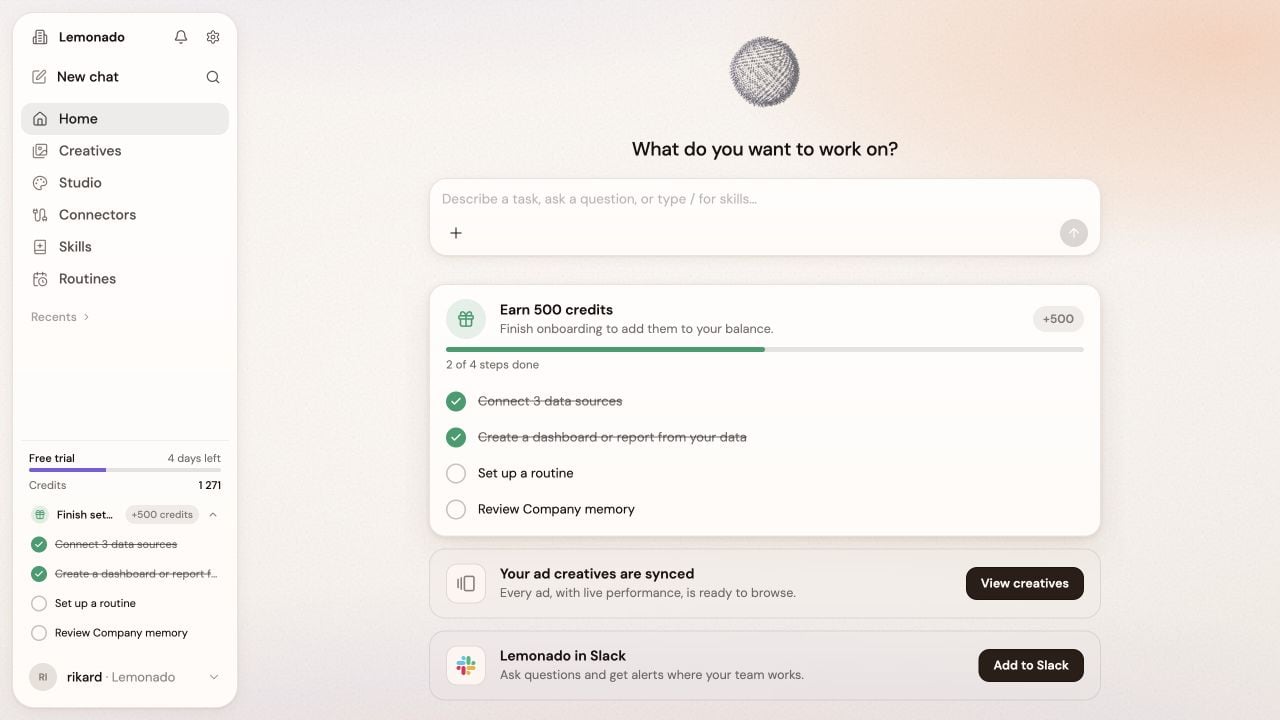
The left menu stays with you while the main area changes with your work.
Find your way around
- Click New chat when you want a clean start.
- Use Recents to return to earlier work.
- Click the gear beside the company name for Memory, Brand, and company settings.
Stay organized
- Use the magnifying glass to search earlier chats.
- Open the bell for notifications and invitations.
- Open your profile at the bottom left, then choose Settings for personal and workspace settings.
- Workspace owners can manage members, billing, and usage there.
Work with your team
Organize chats, invite teammates, and ask for feedback.
If you see Files or Warehouse
If you see Files or Warehouse
These areas appear only when enabled for your workspace.
- Files: choose Personal for your own files or Workspace to share with the team. Use Upload to add files and New folder to organize them.
- Warehouse: explore your data in tables. Ask the assistant to filter or explain a view, then Save it for later. Check who the saved view is available to.